To find Instagram creators who sell, check public commerce signals on their Reels: product tags, paid partnership labels, brand mentions or collabs, bio shop links such as LTK, ShopMy or Amazon, and discount codes or campaign hashtags in captions.
Follower counts and a viral view spike do not show whether a creator regularly tags products or works with shops.
Instagram does not publish order data, so these signals are a public commerce record, not a count of checkouts. You can inspect them by hand on any public profile. MossReels is built to do the same search faster across public U.S. Reels, which it refreshes daily.
In this post, “creators who sell” means creators who leave that public record. It does not mean anyone has seen their orders.
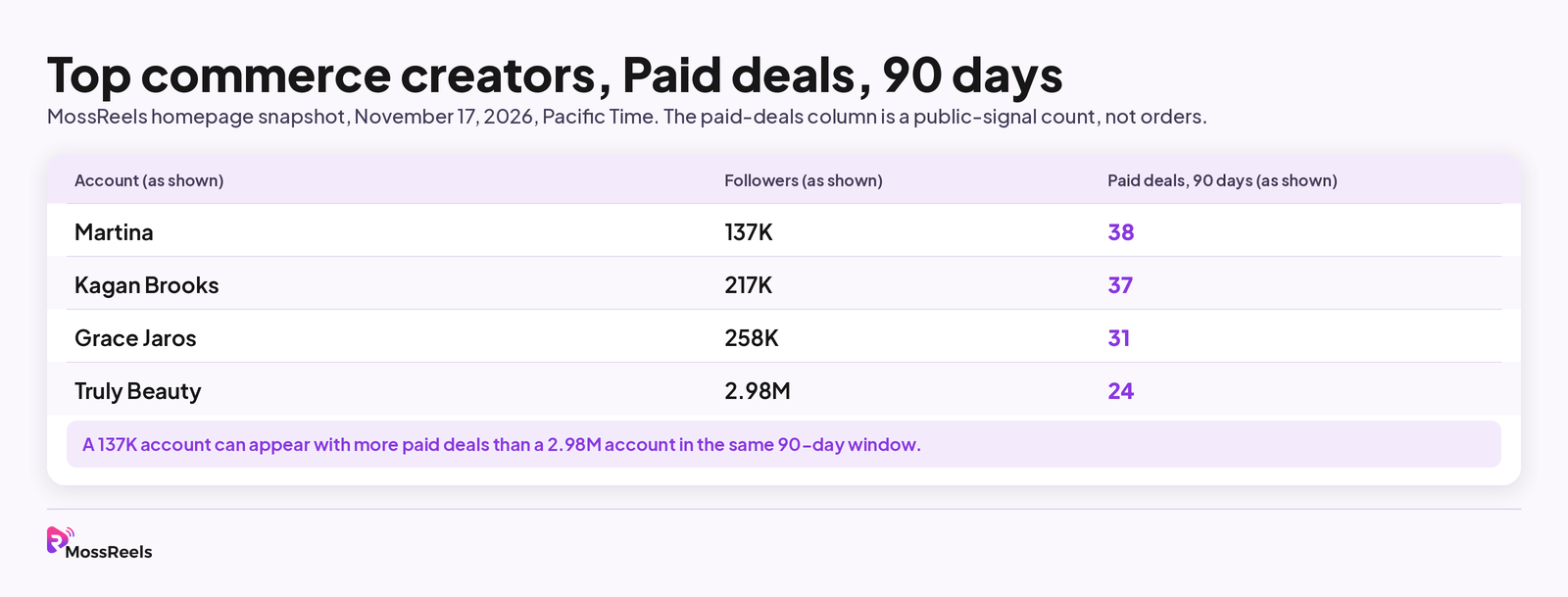
On November 17, 2026, the MossReels homepage listed these accounts under “Top commerce creators, Paid deals, 90 days.” The paid-deals column is the label on that module. It is not a count of orders.
| Account (as shown) | Followers (as shown) | Paid deals, 90 days (as shown) |
|---|---|---|
| Martina | 137K | 38 |
| Kagan Brooks | 217K | 37 |
| Grace Jaros | 258K | 31 |
| Truly Beauty | 2.98M | 24 |
A 137K account can appear with more paid deals than a 2.98M account in the same 90-day window. That is why follower count is a weak first filter when you want Instagram influencers that drive sales.
Why do views and follower counts fall short when you hire a creator?
Views tell you that a Reel reached people. They do not tell you whether the creator tags products, names a shop, or works with brands on a regular cadence.
A single viral Reel can also distort an average. MossReels therefore defines average views as the median of Reel plays over the last 90 days, so one spike does not set the number. Its engagement rate uses the same window, and it is the median of (likes plus comments) divided by plays. The methodology page says plays are used instead of followers because most Reel views come from non-followers.
Follower-based engagement can make a small, loyal audience look strong and still miss the commerce question. A large account can post lifestyle Reels that travel far and still tag few products. The homepage snapshot above is one example of how follower size and paid-deal counts can diverge.
Hidden likes or plays are another trap. MossReels marks those values as hidden, does not treat them as zero, and leaves those Reels out of averages and rankings. If you are checking a profile by hand and a play count is missing, skip that Reel rather than guessing.
Bottom line: compare a creator’s public commerce activity over 90 days, and treat a single view spike as context, not as a hiring reason.
Which public Instagram signals show that a creator sells?
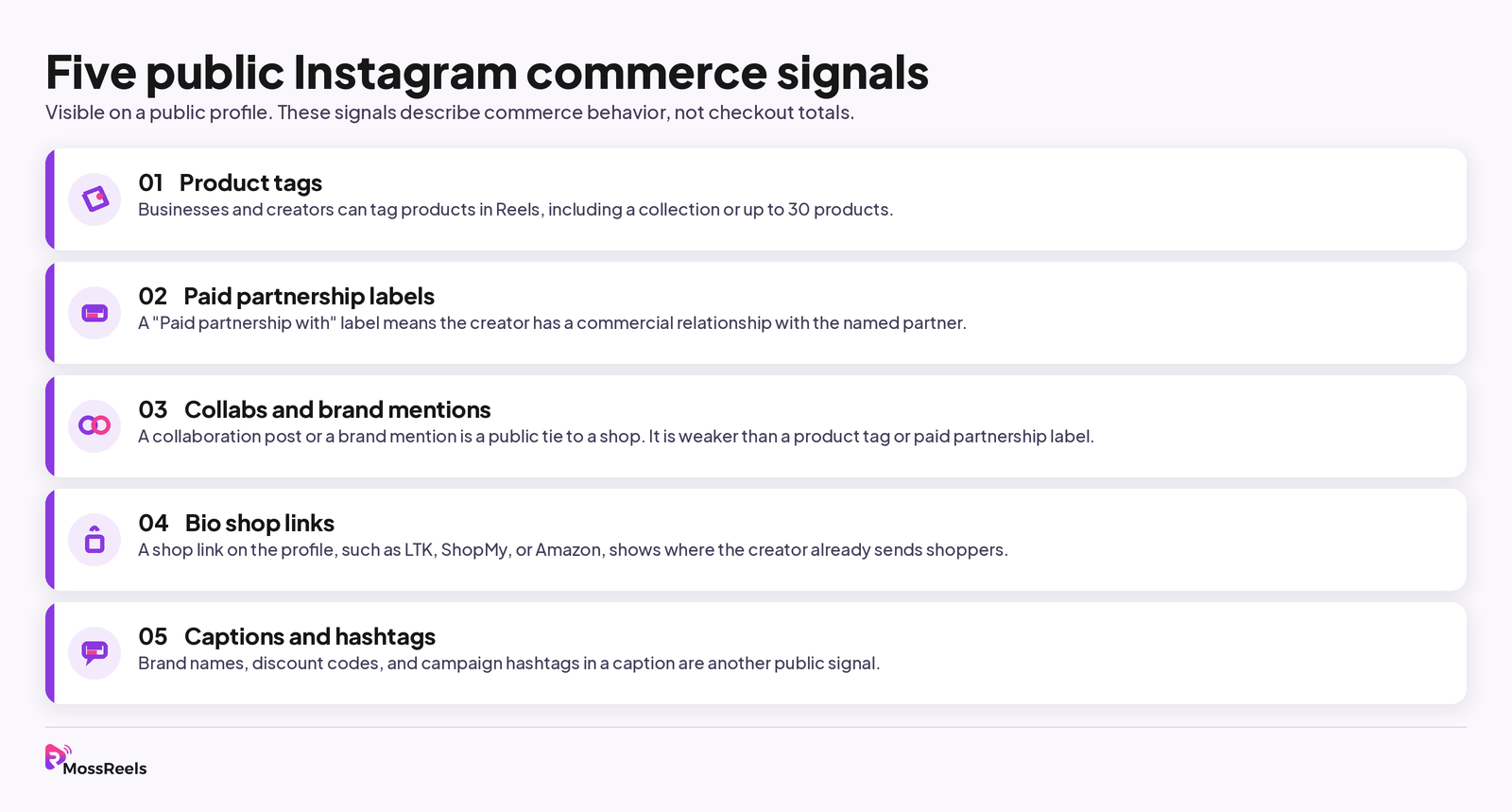
MossReels counts a Reel as commerce content when it has at least one of the signals below. Its homepage FAQ also says unmarked Reels are treated as organic content. None of these signals is an order total. Instagram does not publish that.
Product tags. Businesses and creators can tag products when they create Reels. Instagram’s help pages say you can tag up to 30 products or a collection in a Reel. A creator who tags products in your category is already attaching products to the content, not only talking around them.
Paid partnership labels. When you see “Paid partnership with…” on a post or Story, Instagram says the creator has a commercial relationship with the named partner and was compensated in some way. Meta’s branded content rules also require the label when a creator is paid to post, features a gifted or loaned product, or uses an affiliate product link. The label can appear without the brand name until the partner approves the tag, and Instagram says the label is removed if the brand denies the request. A lack of labels is therefore not proof that no partnership exists. A consistent run of labeled Reels is still a clear public signal.
Collabs and brand mentions. A collaboration post or a brand @mention is another public tie to a shop. It is weaker than a product tag or a paid partnership label, because a mention can be casual. It is still worth logging when you see it next to tags, codes, or shop links.
Bio shop links. MossReels treats a shop link on the creator’s profile as a commerce signal, and its methodology names LTK, ShopMy, and Amazon as examples. Those links show where the creator already sends shoppers, even when a given Reel has no product tag. On November 16, 2026, Instagram also said eligible creators can add Amazon product links on Reels and feed posts, and that eligible creators in the U.S. and Canada can paste an LTK or ShopMy collection link into “Add products.” The same post said product links on creators’ Reels and posts drew about twice as many clicks as the links in their bio, citing Instagram internal data published in September 2026.
Captions and hashtags. Brand names, discount codes, and campaign hashtags in a caption are the last signal MossReels uses. A short personal discount code in the caption is often the easiest one to spot by hand. Write down the brand and the code, then see how often that pattern repeats over 90 days.
A creator may use only some of these. An affiliate creator might lean on an LTK or Amazon link and a caption code, with few shop-catalog tags. A seeded creator might show product tags and a paid partnership label, with no affiliate bio link. Look at the set, not a single checkbox.
Bottom line: use all five public signals, and remember that they describe visible commerce behavior, not checkout totals.
How can you find Instagram influencers that drive sales without a database?
You can build a shortlist from public Instagram pages alone. It takes longer, but the method is the same one a database is automating.
- Pick a starting point you already understand: a rival shop, a product category, or a price band you sell in. Random hashtag browsing produces a long list of high-view Reels and very little commerce context.
- Open recent Reels from rival shops and from products you already watch. Look for product tags and “Paid partnership with” labels, then write down the creator handles that appear.
- Open each profile. Read the bio for LTK, ShopMy, Amazon, or another shop URL. Note the link even if you do not click through every storefront.
- Scroll the Reels grid across about 90 days, not only the last three posts. Count how many Reels carry tags, paid partnership labels, or caption codes. Note the last time you see a tagged or labeled Reel. A creator who used to post shoppable Reels and then stopped may be a poor seed.
- Look at view counts across many Reels. A rough median, meaning the middle value in the set, is more useful than the highlight Reel at the top of the grid.
- Check the products they tag against your price band. The middle of their tagged prices should be close to what you sell. A creator whose tagged products sit far above or below your price can still have strong views and still be a mismatch.
- List the shops they already tag. If they already work with a direct rival, decide in advance whether that is a conflict or a compliment.
- Only then ask for a media kit, a rate, or a sample. The public record should come first.
This is slow because you can judge only one profile at a time, and Instagram will not give you a 90-day table of tagged Reels. If you need to compare many creators in one sitting, browse U.S. creators on MossReels and apply the same checks to the fields it already computes.
Bottom line: start from rival shops and product tags, then vet each profile across 90 days of Reels, bio links, codes, and price band, before you send anything.
What should you check before you send a sample?
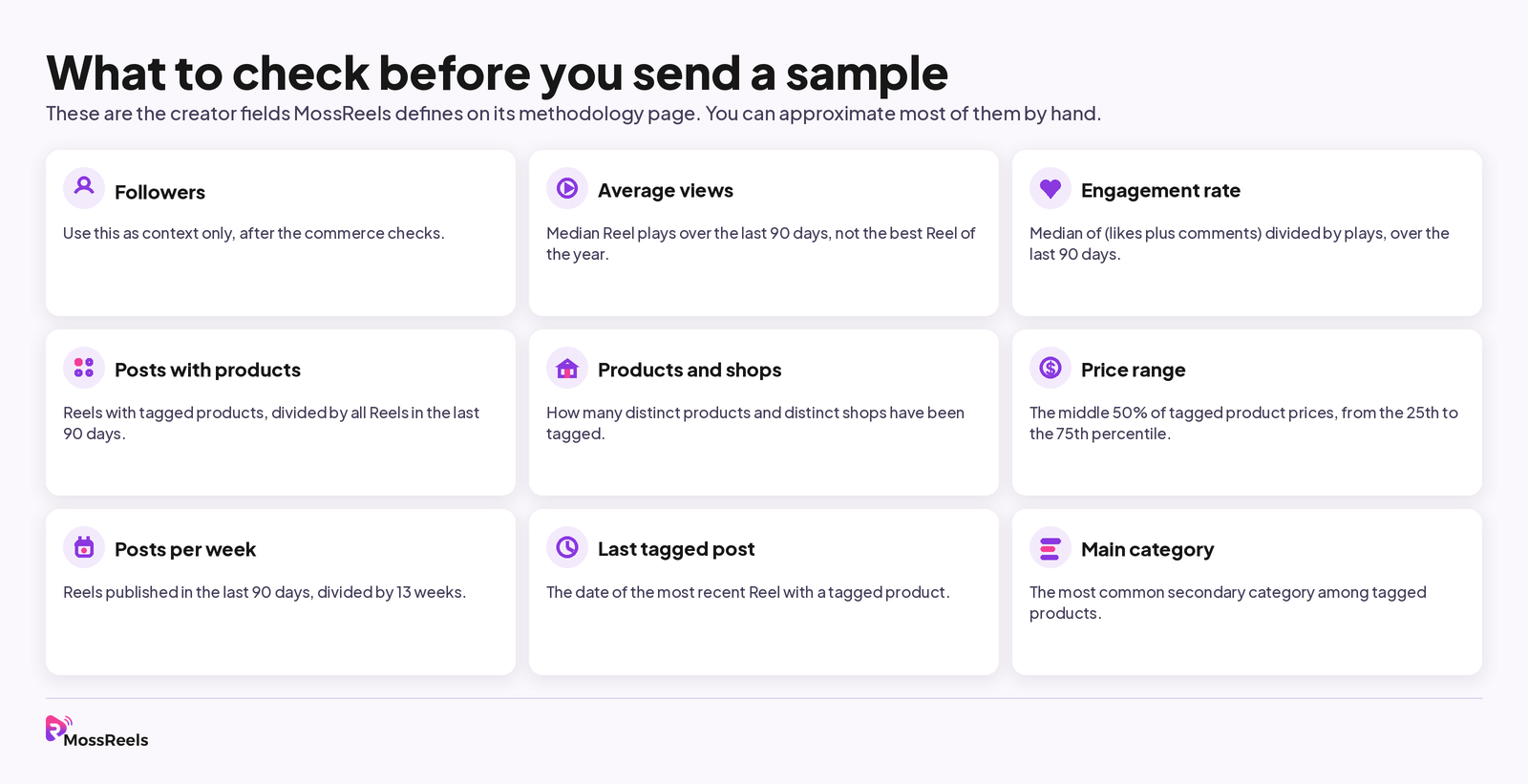
Once you have a shortlist, score each creator on the same fields so the comparison is fair. These are the creator fields MossReels defines on its methodology page. You can approximate most of them by hand.
- Followers. Use this as context only, after the commerce checks.
- Average views. Median Reel plays over the last 90 days. This is the reach figure that should enter a brief, not the best Reel of the year.
- Engagement rate. Median of (likes plus comments) divided by plays, over the last 90 days. This answers whether people react to the Reels. It still does not tell you which shops or products appear.
- Posts with products. Reels with tagged products, divided by all Reels in the last 90 days. A high share means shoppable content is a habit, not a one-off.
- Products and shops. How many distinct products and distinct shops have been tagged. A creator who tags many products for one shop is a different partner from a creator who tags a new shop every week.
- Price range. MossReels uses the middle 50% of tagged product prices, from the 25th to the 75th percentile. By hand, you can list the tagged prices you can see and ignore the most extreme ones.
- Posts per week. MossReels counts Reels published in the last 90 days, then divides by 13 weeks. Cadence matters if you need more than a single post.
- Last tagged post. The date of the most recent Reel with a tagged product. If that date is old, the commerce record may be stale.
- Main category. The most common secondary category among tagged products. MossReels organizes products into 27 primary categories, aligned with the TikTok Shop category tree, and 192 secondary categories. Hiring inside the category you sell in beats hiring a generalist with one off-topic tag.
If two creators have similar median views, prefer the one whose tagged products, shops, price band, and posting cadence already match what you sell. The larger follower count can wait until that match is clear.
Bottom line: send samples to creators whose 90-day record shows product tags in your category and price band, on a cadence you can live with.
How can MossReels speed up the same search?
MossReels is a commerce data platform for public Instagram Reels in the United States. It does not cover private accounts, Stories, or deleted content, and it does not have order data.
As of November 17, 2026, the product reports 128 million commerce videos, 24.1 million creator profiles, 4.86 million products, and 920,000 shops and brands, with daily updates. The homepage labels the video count as tagged Reels. The methodology page uses the phrase commerce videos. Both pages publish the same figures.
Creator, brand, and product lists with basic fields are open to browse. You can search U.S. creators by the signals in this post, then open a profile to see median views, the share of Reels with tagged products, shops and products tagged, price range, posting cadence, and the last tagged post. Lists and charts support 7, 28, and 90-day ranges. Basic includes the last 30 days of history, and Pro includes full history.
When a creator has a public email, paid plans can open it from the profile. Basic includes 50 contacts a month and Pro includes 300. Plan limits and prices are listed on the pricing page.
The faster path is the same path described above. You still start with a category or a rival shop, still compare 90-day commerce signals, and still reject a high-view creator who does not tag products you would sell. The database saves you from doing that math on every profile by hand.
Bottom line: use MossReels when you want to run these public-signal checks across many U.S. creators at once, and keep using Instagram itself to confirm how a Reel looks before you reach out.
FAQ
Can MossReels tell you how many orders a creator generated?
No. Instagram does not publish order data. MossReels records public commerce signals on Reels, such as product tags, paid partnership labels, bio shop links, and caption codes. Those signals can support a hiring decision. They are not a sales report.
How do you find Instagram creators who sell if they do not use product tags?
Check the other public signals. Look for paid partnership labels, collabs and brand mentions, LTK, ShopMy, or Amazon links in the bio, and discount codes or campaign hashtags in captions. A creator can send shoppers to an affiliate storefront without tagging a shop catalog.
Should you still look at engagement rate?
Yes, after the commerce checks, not instead of them. Engagement rate tells you whether people react to the Reels. It does not tell you which products or shops appear. If you use MossReels, the engagement rate is the median of (likes plus comments) divided by plays over 90 days.
Does this method work outside the United States?
The hand checks work on any public Instagram profile. MossReels coverage is the United States for now. Its product categories match TikTok Shop’s top-level categories, but the Reels it collects are U.S. public Reels.
How often is the MossReels data updated?
Daily. The 90-day window rolls forward every day. Re-check a shortlist before you send samples, because last tagged dates and median views can move.
Sources checked on November 17, 2026, Pacific Time: MossReels homepage, MossReels methodology, MossReels pricing, MossReels help, Instagram Help Center pages on paid partnership labels and tagging products in Reels, Meta’s page on what counts as branded content, and Instagram’s November 16, 2026 creator post on affiliate product links.